Content Delivery Network
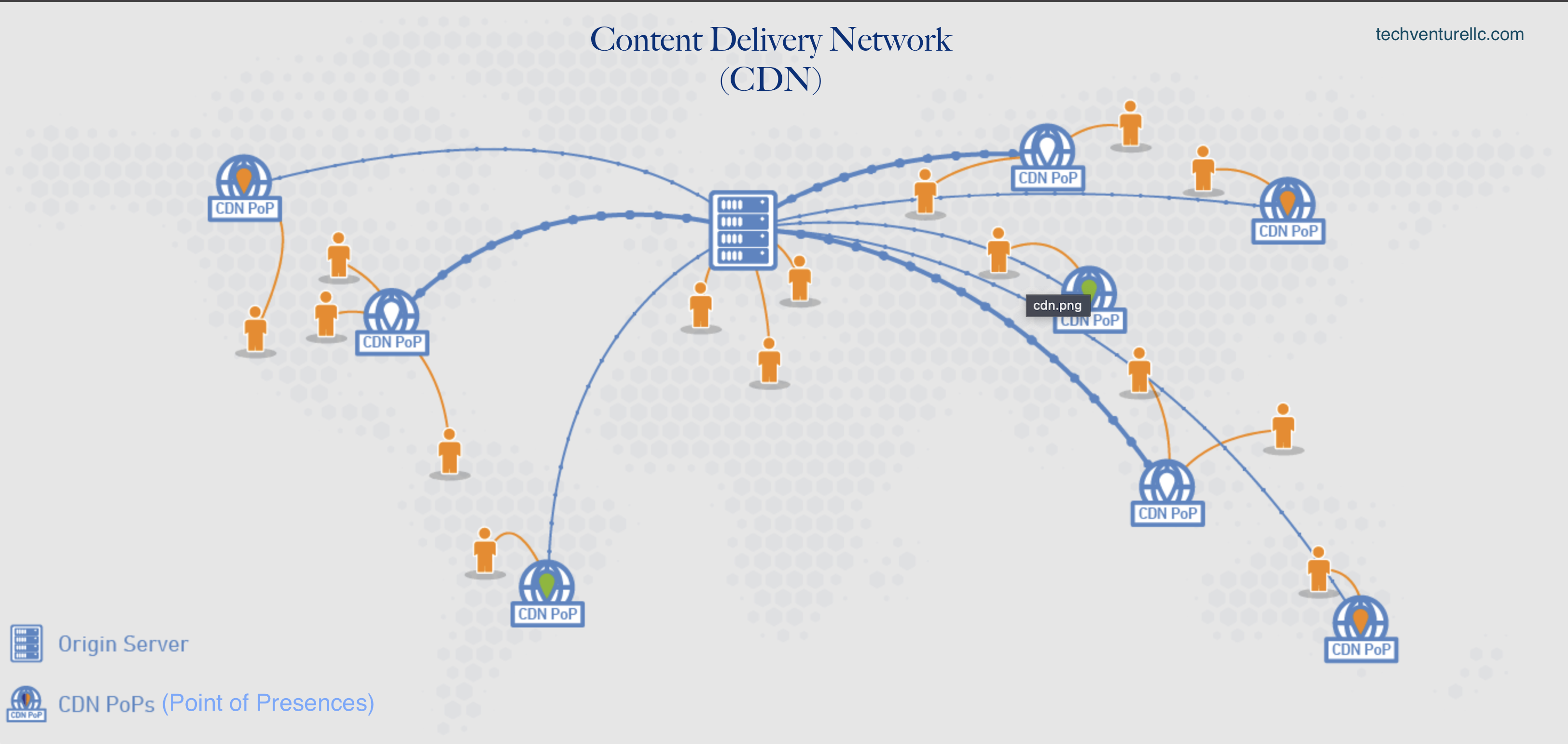
A Content Delivery Network (CDN) is a network of geographically distributed servers that store website content and deliver it to users from the closest server, improving website performance and reliability. CDNs reduce latency, increase website speed, and provide security benefits, making them a popular solution for websites with a global audience, high traffic volume, and large amounts of static content.
Core concepts
- Points of Presence (PoPs): edge locations that cache and serve content closer to users.
- Edge cache & origin shield: reduce origin load; shield adds a mid‑tier cache to cut cache‑miss fan‑out.
- Cache key: which request parts determine a unique cached object (path + host + query params + headers/cookies).
- TTL & invalidation: how long to keep objects and how to purge quickly when content changes.
- Compression & image optimization: gzip/brotli, WebP/AVIF, responsive images.
- TLS, WAF & DDoS: security at the edge; rate limiting, bot mitigation, mTLS if needed.
- Geo‑routing: route to the closest/allowed region; handle GDPR/geo‑fencing rules.
Concepts & Q&A
How does CDN work ?
CDNs work by storing website content, such as images, videos, scripts, and other files, on a network of servers located in different parts of the world, known as Points of Presence (PoPs). When a user requests content from the website, the CDN automatically serves the content from the server that is closest to the user's location, reducing the latency and improving the website's load time. The basic steps in how a CDN works are as follows:
- The website owner uploads their website content to the CDN.
- The CDN replicates and caches the content on multiple servers across the world.
- When a user requests content from the website, the CDN routes the request to the nearest server with a copy of the content.
- The content is served to the user from the server closest to their location, reducing latency and improving website performance.
- The CDN monitors traffic and server performance, and automatically routes traffic to available servers in case of server failures or maintenance.
- The CDN also provides security features such as DDoS protection, encryption, and content filtering, improving website security and protecting against malicious traffic.
what problems does CDN solves ?
CDNs solve several problems that websites face, such as:
- Latency and slow load times: CDNs reduce the latency between the website server and the user's device by serving content from a server closest to the user, resulting in faster load times.
- High traffic volume: CDNs distribute the load of website traffic across multiple servers, reducing the load on any single server and ensuring that website performance is not affected by sudden traffic spikes.
- Reliability and availability: CDNs improve website reliability by automatically routing traffic to available servers and minimizing downtime due to server failures or maintenance.
- Bandwidth costs: CDNs can reduce bandwidth costs for website owners by offloading some of the traffic to the CDN's servers, reducing the amount of data that needs to be served from the website's own server.
- Security: CDNs can provide security benefits such as protection against DDoS attacks and other forms of malicious traffic, as well as content encryption and secure transmission of data.
Is there any disadvantages of using CDN ?
While CDNs offer several benefits, there are also some potential disadvantages to consider, including:
- Cost: Some CDNs charge fees based on the amount of data transferred or the number of requests made, which can be a significant expense for websites with high traffic volume.
- Complexity: Configuring and managing a CDN can be complex, especially for websites with a large number of assets and a complex infrastructure. This can require specialized expertise and may add additional complexity to the website's architecture.
- Single point of failure: While CDNs are designed to improve website availability and reliability, they can also create a single point of failure. If the CDN experiences an outage or is unavailable, it can affect the entire website, especially if the website is heavily reliant on the CDN.
- Cache consistency: CDNs rely on caching to improve performance, but this can create issues with cache consistency, where users may see outdated content if the CDN has not yet refreshed its cache.
- Privacy concerns: Some CDNs may collect user data or have access to sensitive information, which can raise privacy concerns for website owners and users. It's important to carefully evaluate the privacy and security policies of any CDN provider before using their services.
Conclusion
Overall, CDNs improve website performance, reduce latency, and increase website availability and reliability by distributing content across a network of servers and automatically serving it from the closest server to the user's location.